|
|
| Line 15: |
Line 15: |
|
| |
|
|
| |
|
| [[Step_by_Step_Project_Creation|<== Back ]] | | [[Creating a Globalyzer Project|<== Back ]] |
| ----
| |
| | |
| [[Step by Step Project Creation |Step 1:Data Source Credential for the project]]
| |
| | |
| [[Choose a Repository|Step 2:Choose a Repository]]
| |
| | |
| [[Name The Project and Type |Step 3: Name the Project]]
| |
| | |
| [[Creating a Globalyzer Project |Creating a Globalyzer Project - Step 4: Globayzer Lite Definition File]]
| |
| | |
| [[Creating a Localyzer Project| Creating a Localyzer Project - Step 5: Which MT or TMS will Localyzer use ]]
| |
| | |
| [[What are the Localyzer locales| Step 6: What are the locales Localyzer is acting on? ]]
| |
| | |
| [[Resource File(s) Format| Step 7: Resource file formats]]
| |
| | |
| [[Include and Exclude Patterns|Step 8: Set up optional include or exclude patterns]]
| |
| | |
| [[Optional Localyzer Settings|Step 9: Optional Advanced Localyzer Settings]]
| |
| | |
| [[Grant Users and Teams Access | Step 10: Grant Users and Teams Access]]
| |
Revision as of 19:18, 5 September 2023
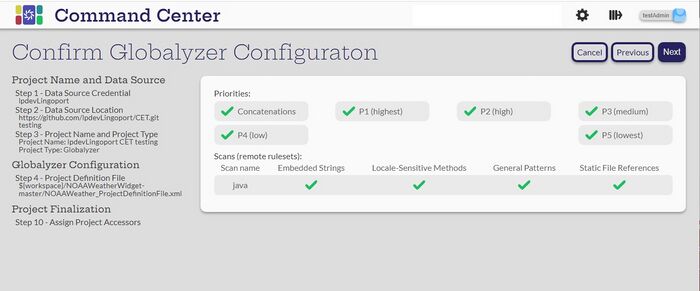
Verify that the selections are the expected ones.
Select Next
If this is a Globalyzer-only project, the next step will be to Grant Users and create the project.
Step 10: Grant Users and Teams Access
If this project will also have Localyzer, then the next part will be to configure that.
Creating a Localyzer Project -Step 5: Which MT or TMS will Localyzer use
<== Back
