InContext Capture Installation
Pre-Requisites
In order to use Lingoport InContext Capture, the user must have access to the Google Chrome browser. Lingoport InContext Capture is based off a Chrome extension and other browsers do not have the same capability. Firefox or Internet Explorer can not be used as the browser in this situation.
The reviewer needs to have the following information which should be set up by the InContext Server:
- The InContext Server URL
- An InContext Chrome token.
In addition, the reviewer will need:
- Their email address
InContext Capture Chrome Extension Installation
From within the Google Chrome Browser:
- Navigate to https://chromewebstore.google.com/detail/pfhilleaddddcomaalagghocgkkkofdl?utm_source=item-share-cb
- Click on Add to Chrome and confirm if prompted.
- Go to chrome://extensions page and select Lingoport InContext Capture and turn on "Pin to toolbar"
You should see the Lingoport swirl  at the top of the Chrome browser window.
Chrome Extension Configuration
- Before configuring the Chrome InContext Capture extension, a chrome token needs to be created in InContext Server.
- Right-click on the Lingoport swirl
 for the Chrome Extension (top right corner of your Chrome)
 - Click on the 'Options' selection of the pulldown.
- Fill in the data, using the Chrome token and http://yourserverurl:8081/incontext-server and Save Credentials
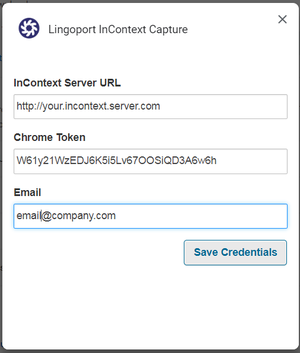

- The process is successful if the dialog box shows: Credentials saved successfully. Close the dialog box.
Verifying InContext Capture
- Lingoport has created a test web application with instrumented values. Go to Lingoport's Test InContext Capture Page (open in a new tab) in Chrome. This page is instrumented and can be used to test the capture.
- While in the sample page, right-click on the InContext Capture icon.
- Select Auto-capture this tab.
- You should see the working icon
 followed by the success icon
  .
. - Return to your InContext Server, login, and you should see the captured strings.


If you select one of the keys, a tab will open to show the context of the value.

You should be ready to do InContext Capture.